 Racqt
RacqtNew in 1.6.0 Web
Cash book
What happens on your club accounts, recorded cleanly and traceably — with accounts, categories and a period closing before the cash audit.
On this page
The cash book (“Kassenbuch”) records what actually happens on your club’s accounts — every deposit, every withdrawal, with a running balance. You’ll find it under Finanzen › Kassenbuch (Finances › Cash book).
Who sees this area? The cash book only appears for accounts with the Beiträge & Finanzen (Fees & finances) permission area — it’s included by default for the Kassenwart (treasurer).
What belongs in the cash book
The cash book reflects your account — not who paid what individually. If you collect the fees of 300 members by direct debit, one line ends up in the book for it: the credit, just as it appears on your bank statement. Who of the 300 paid and who didn’t is still under fees — that’s not what the cash book is for.
If a single direct debit from such a collection is returned, it’s not deducted from the original credit. It gets its own line in the book, just as the return appears on the bank statement. That way every entry in the cash book can always be traced back to a line on the bank statement.
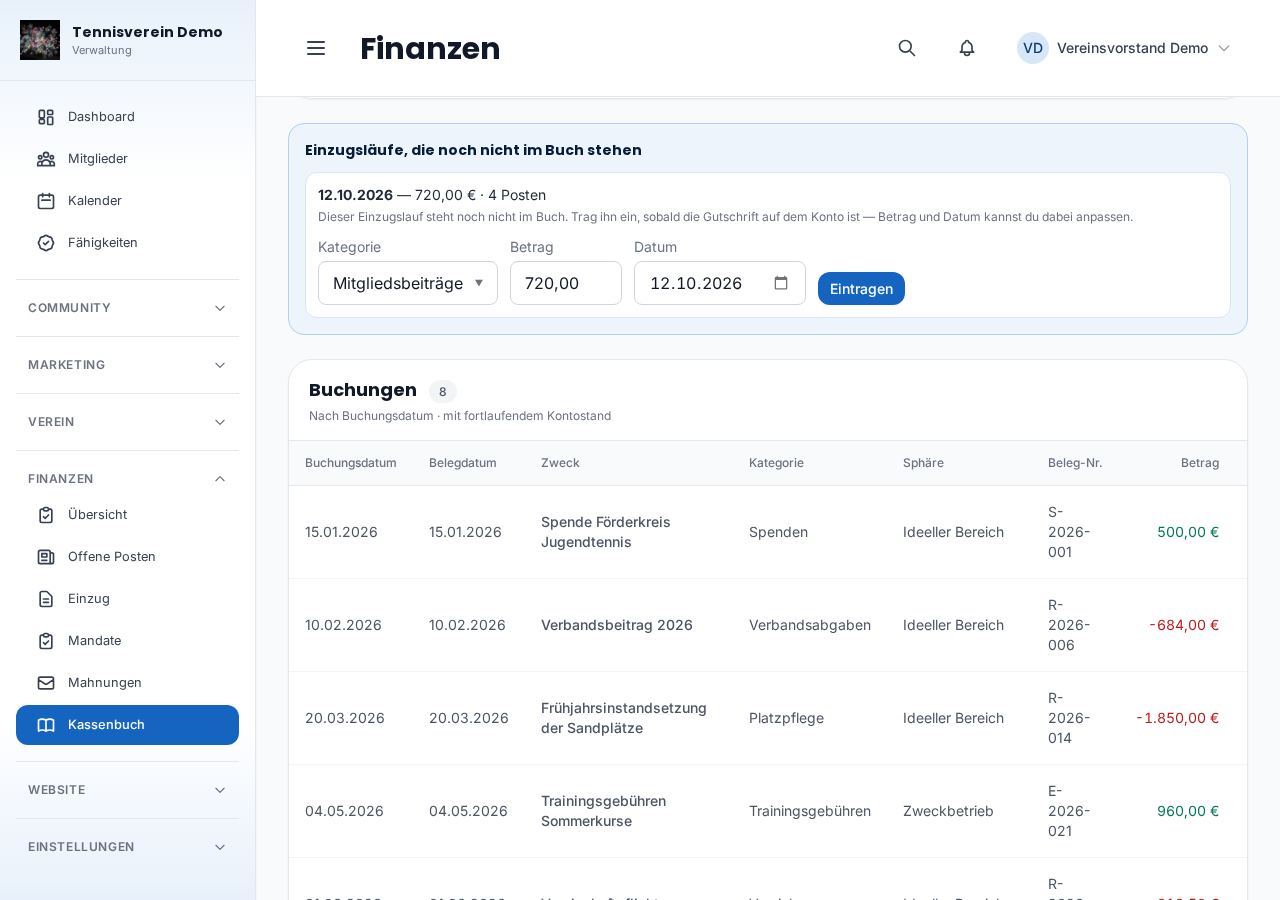
An approved collection run that isn’t in the book yet is suggested to you automatically at the top of the page. When confirming, you can still adjust the amount and date to what actually arrived on the account. It can be entered on your bank account — that’s where the direct debit arrives, after all. If you’ve just chosen petty cash or a retired account, the suggestion offers to switch to the bank account instead.
Accounts: cash or bank
Under Finanzen › Kassenbuch › Konten (Accounts) you set up what needs to be kept — a bank account, petty cash, or both. Each account has an opening balance and an opening date; the current balance is always recalculated from these, not stored — so it’s always current and never inconsistent with the entries.
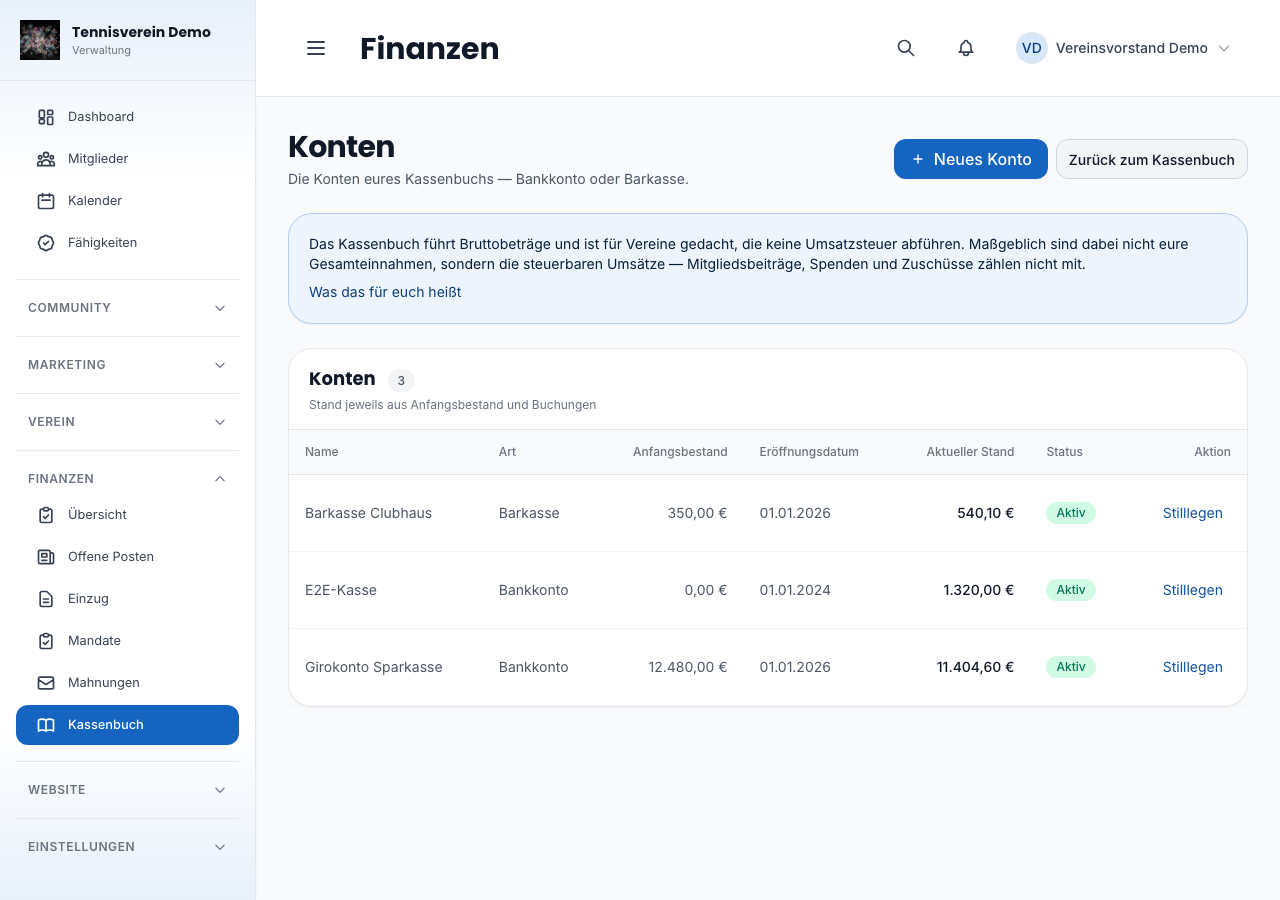
An account can be retired but not deleted — just like a category. If you change bank, you create the new account and retire the old one: it disappears from the selection, but its existing entries stay readable and still count towards its balance. Deleting wouldn’t even be possible without removing the basis of locked entries.
Petty cash has one special feature: in reality it can’t go below zero. If it does slip below zero in the book, Racqt points this out when you book — the entry is still created so you aren’t interrupted mid-entry, but you know: an income entry is probably still missing here.
Categories and the sphere
Every entry gets exactly one category — membership fees, court maintenance, bank charges and so on. With the first account, Racqt creates a starter set of common club categories for you; you can rename, add to or retire them, just as your club needs.
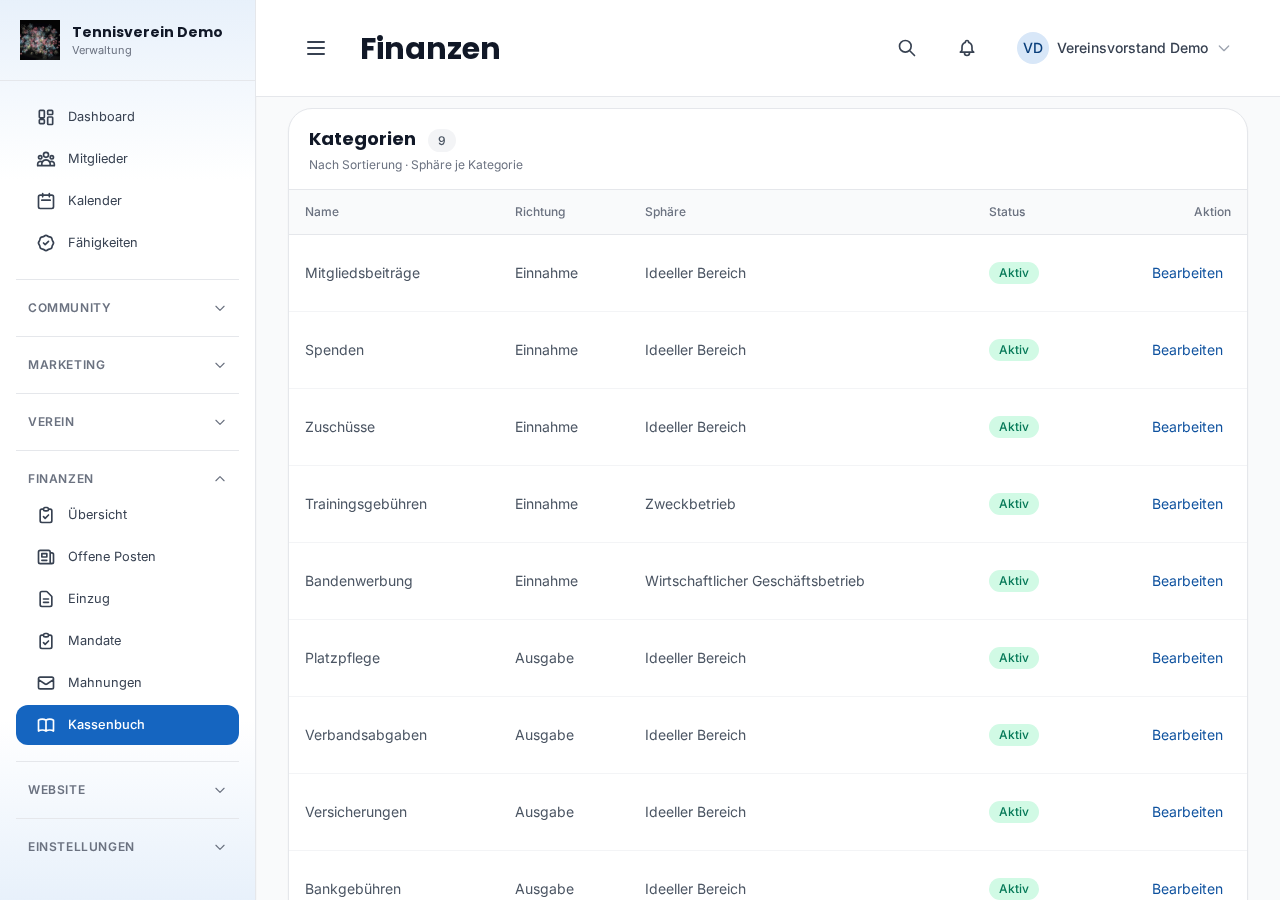
Each category has a sphere — it decides how the German tax office treats an income or expense:
- Ideeller Bereich (non-profit area) — the core of a non-profit club: membership fees, donations, grants.
- Vermögensverwaltung (asset management) — such as interest or income from leasing your clubhouse.
- Zweckbetrieb (purpose-related business) — income that directly serves your club’s purpose, such as training fees.
- Wirtschaftlicher Geschäftsbetrieb (commercial business) — everything beyond that, for example perimeter advertising.
You set the sphere once per category, not for every single entry — when booking you only choose the category, and the sphere follows by itself. If you change it later, it affects everything not yet closed; periods already closed stay as they were.
Entering a booking
Every entry has two dates: the Belegdatum (receipt date) — when the receipt was issued — and the Buchungsdatum (booking date) — when it goes into the cash book. The two often coincide but don’t have to. If someone hands in a receipt from February in April, you still book it cleanly in April, with the February date as the receipt date — instead of touching a month that’s already closed.
There’s also account, category, amount, a free text for the purpose and optionally a receipt number if you number your receipts. If you clear the receipt number when editing, it really is gone afterwards. Whether an entry is income or an expense follows from the chosen category — you don’t need to type a minus sign.
To book you need at least one account and one category. If one of them is still missing, the cash book tells you exactly that and takes you straight there with Konten anlegen (Create accounts) or Kategorien anlegen (Create categories) — until then Neue Buchung (New booking) is locked.
To enter a booking, a panel opens on the right while the cash book stays visible next to it — so you can still see what’s already booked while typing the next receipt.
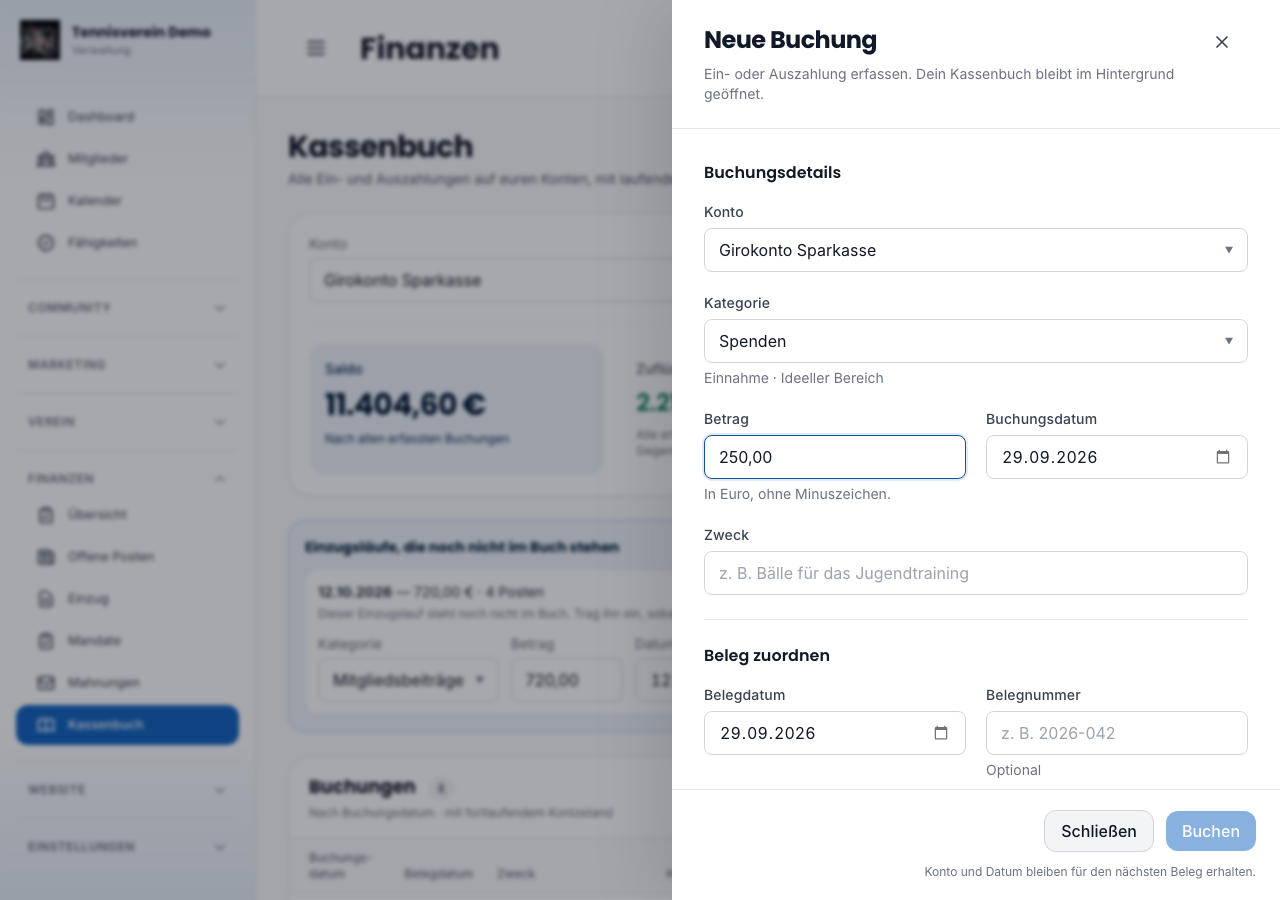
This panel is deliberately a little stubborn: a click next to it does not close it. With a half-typed receipt, that would be the most annoying slip. To close it there’s the button at the top right, the “Schließen” (Close) button at the bottom and the Escape key. And even then nothing is lost — your unfinished receipt is there again the next time you open it.
After saving, the panel stays open. If you’re working through a stack of bank statements, you just keep typing without opening it every time. Only if you switch the account at the top does the form start fresh — otherwise there’d be a risk that you see petty cash but book to the current account.
You create a new account the same way: under Konten (Accounts) the same side panel opens, and the account list stays next to it.
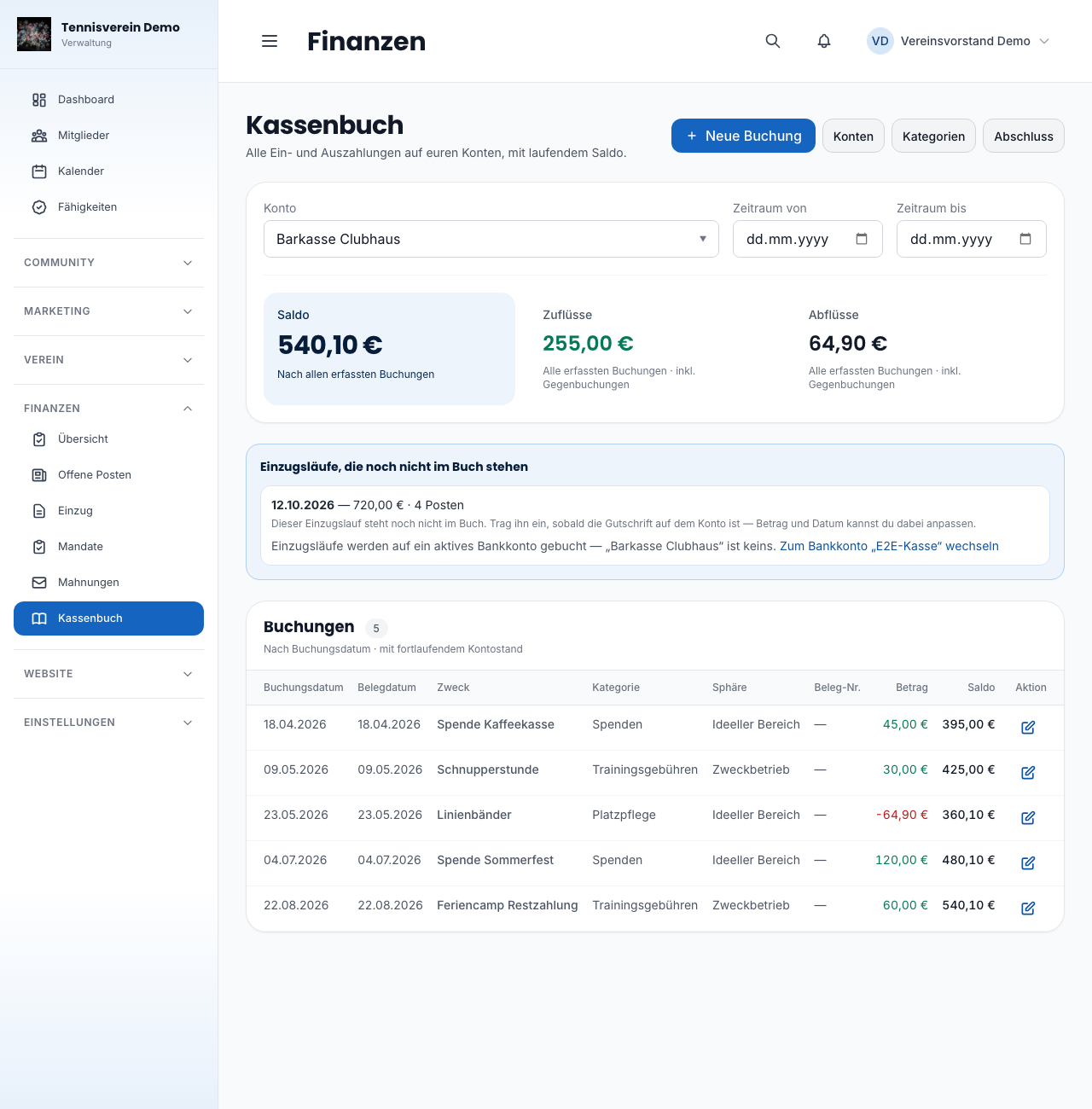
The list shows the running balance for every entry — the account balance right after that entry. That way you see at a glance how your account has developed over time, without adding things up yourself.
Above the list you choose account and period. The period only limits what you see — the figure next to it remains the account balance and also counts everything booked before the chosen start. Otherwise there’d be a total there that doesn’t match any bank statement.
An entry that isn’t locked yet can be edited — it isn’t part of an audited period yet, and a typo is simply a typo. Once it’s locked, that’s no longer possible; instead the list offers Stornieren (Reverse), and a reversal entry is created. It is marked as such in the list and lies in the open period — more on that in a moment.
Original and reversal then remain as a pair, exactly as they are: if one side were changed afterwards, the reversal would no longer cancel the original. Instead of “Bearbeiten” (Edit), both therefore show “Neu buchen statt ändern” (Book again instead of changing) — if the amount was wrong, you simply book the correct one again.
Closing a period
Under Finanzen › Kassenbuch › Abschluss (Closing) you lock a period — usually a financial year. That’s the natural moment just before your cash audit: everything up to a chosen date is frozen, with an overview of how many entries are affected and what total falls to which sphere.
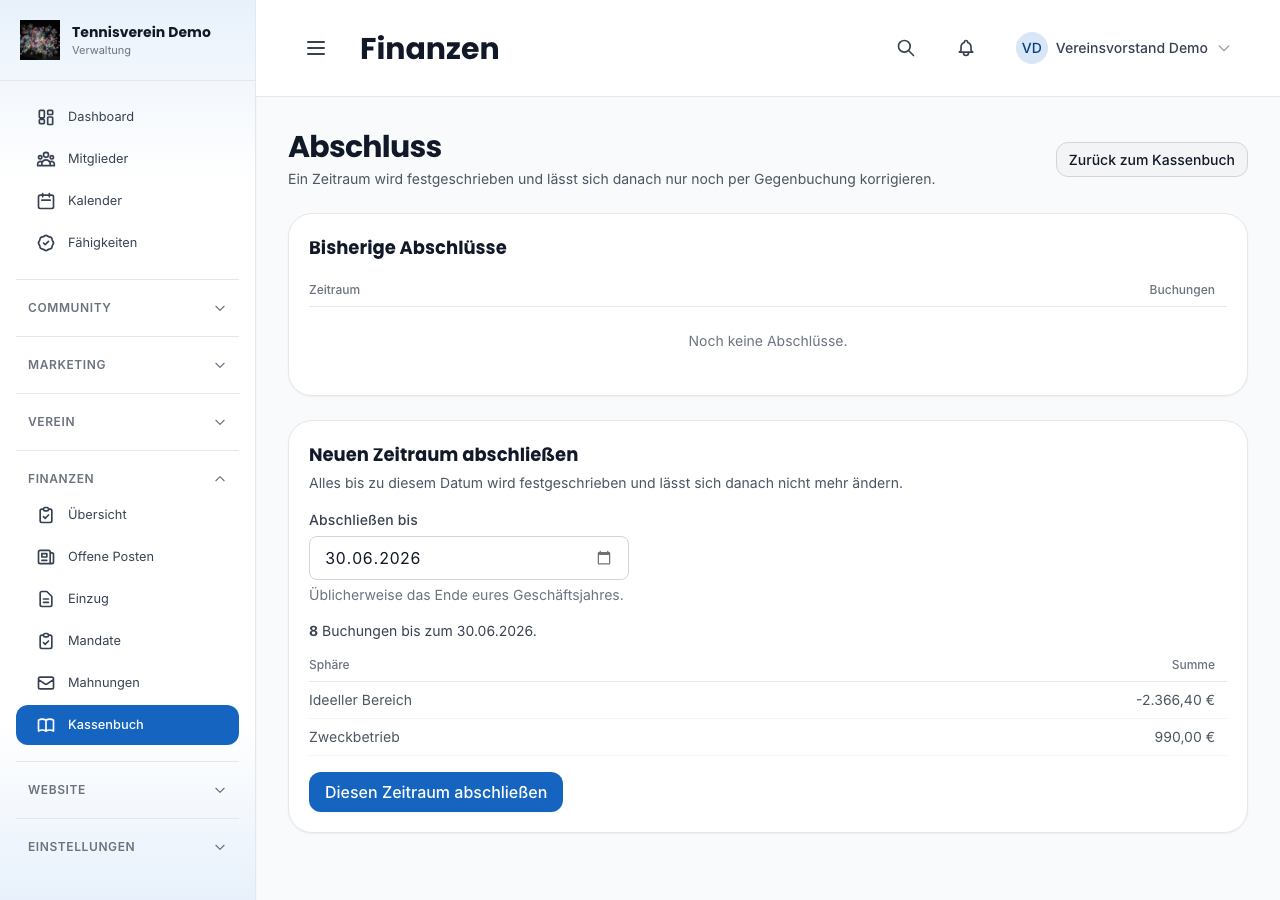
Closing is irreversible. Whatever is in that period afterwards can no longer be changed or deleted — only corrected with a reversal entry, which itself stays visible in the book. That’s exactly what makes the cash book auditable later: nobody can change anything in an already audited cash book afterwards without leaving a trace.
Petty cash prevents closing as soon as it was in the red at the end of any day of the period to be locked — not only if it still is on the closing date. If your petty cash was at -€50 on 10 February and back in the black on 20 February, closing is still rejected: in reality, cash can’t go below zero, and a minus at the end of a day means an income entry is missing on that day. The message names the cash account, day and amount. First find out which income is missing, add it and then close.
Within a day only the end of the day counts: the cash book doesn’t record a time, so it doesn’t know whether the expense or the income came first. A minus that balances out the same day is therefore not a finding. We already point out such a minus day when you enter the booking — the same check, only earlier.
The VAT threshold
The cash book keeps gross amounts and is intended for clubs that don’t pay VAT. What matters is not your total income but your taxable turnover — membership fees, donations and grants don’t count. If you bill training fees through the club or run a clubhouse restaurant yourselves, talk it through with your tax adviser once.
What the cash book can’t do (yet)
It doesn’t replace a receipt archive — uploading or managing receipts isn’t possible here. Nor is there an income statement evaluation (EÜR) or an export for the tax return, an automatic bank import or recurring entries that repeat themselves. What you record today, you still enter by hand — in return, it always stays traceable what you booked and when.
Related articles: Finances: open items, collection, reminders · Fees
In the changelog:1.6.0