 Racqt
RacqtNew in 1.6.0 Web
Finances
Keep an eye on open items, collect fees by SEPA direct debit, send reminders and dunning letters — the treasurer’s area.
On this page
Finanzen (Finances) is its own sidebar group next to Verein (Club) — for everything to do with collecting your fees: open items, direct debit collection, reminders. Maintaining fee rates and starting the fee run is covered in Fees. What actually happens on your club accounts, you keep in the cash book. The dashboard is in German; we name the German labels.
Who sees this area? Finances only appears for accounts with the Beiträge & Finanzen (Fees & finances) permission area — it’s included by default for the Kassenwart (treasurer). Anyone who only maintains the member list doesn’t see this menu item at all and so doesn’t run into error messages because they’re not allowed to do something.
The starting point: the “Finances” page
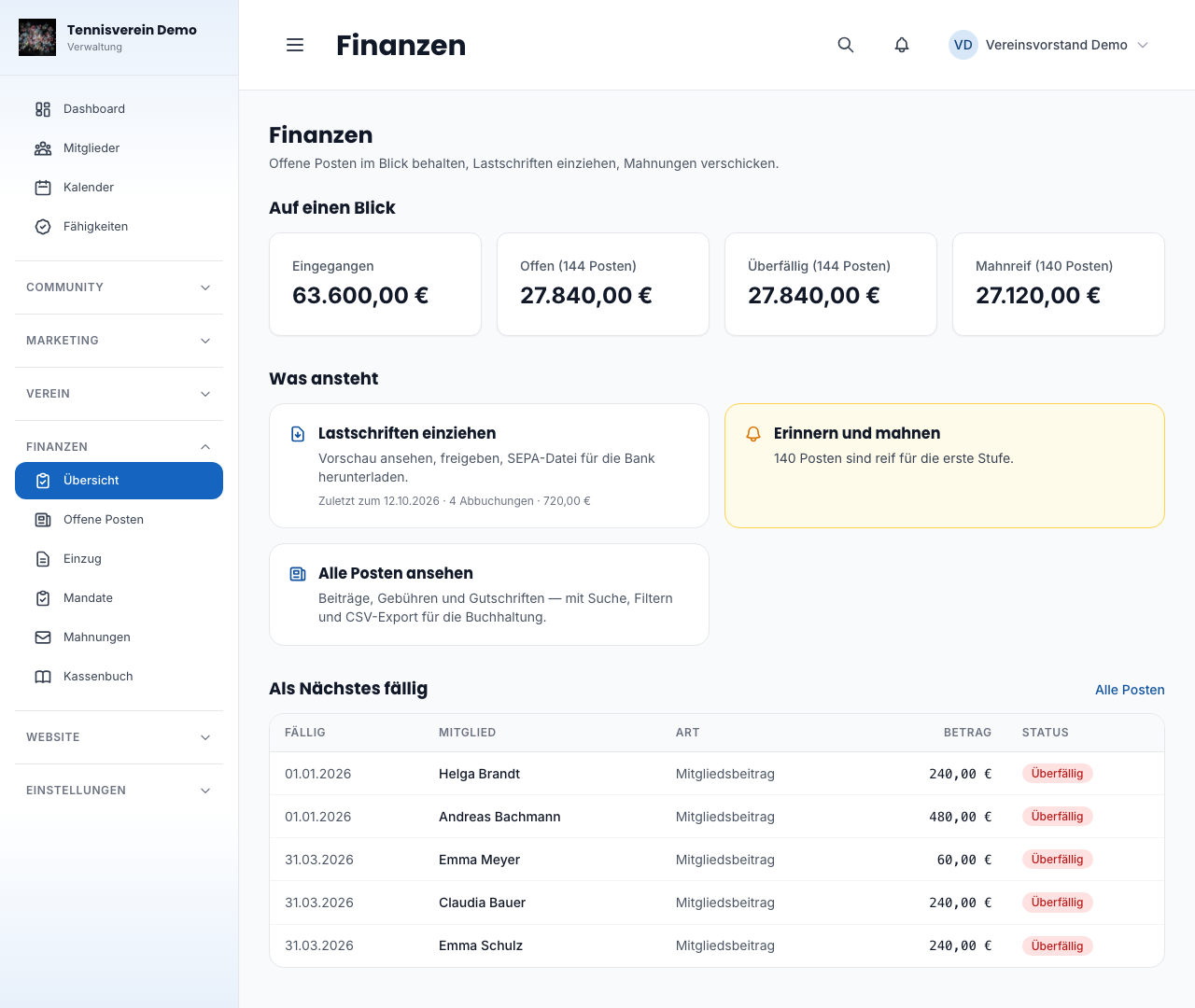
At the top are four real amounts for the current year: Eingegangen (received), Offen (open), Überfällig (overdue) and Mahnreif (due for reminder) — the amount of the items that are due for the first reminder stage. How many items each covers is shown in the tile’s heading. Below, three tiles lead straight on: Lastschriften einziehen (Collect direct debits), Erinnern und mahnen (Remind and dun), Alle Posten ansehen (View all items) — each shows right away what’s coming up. At the very bottom are the next items due.
Open items
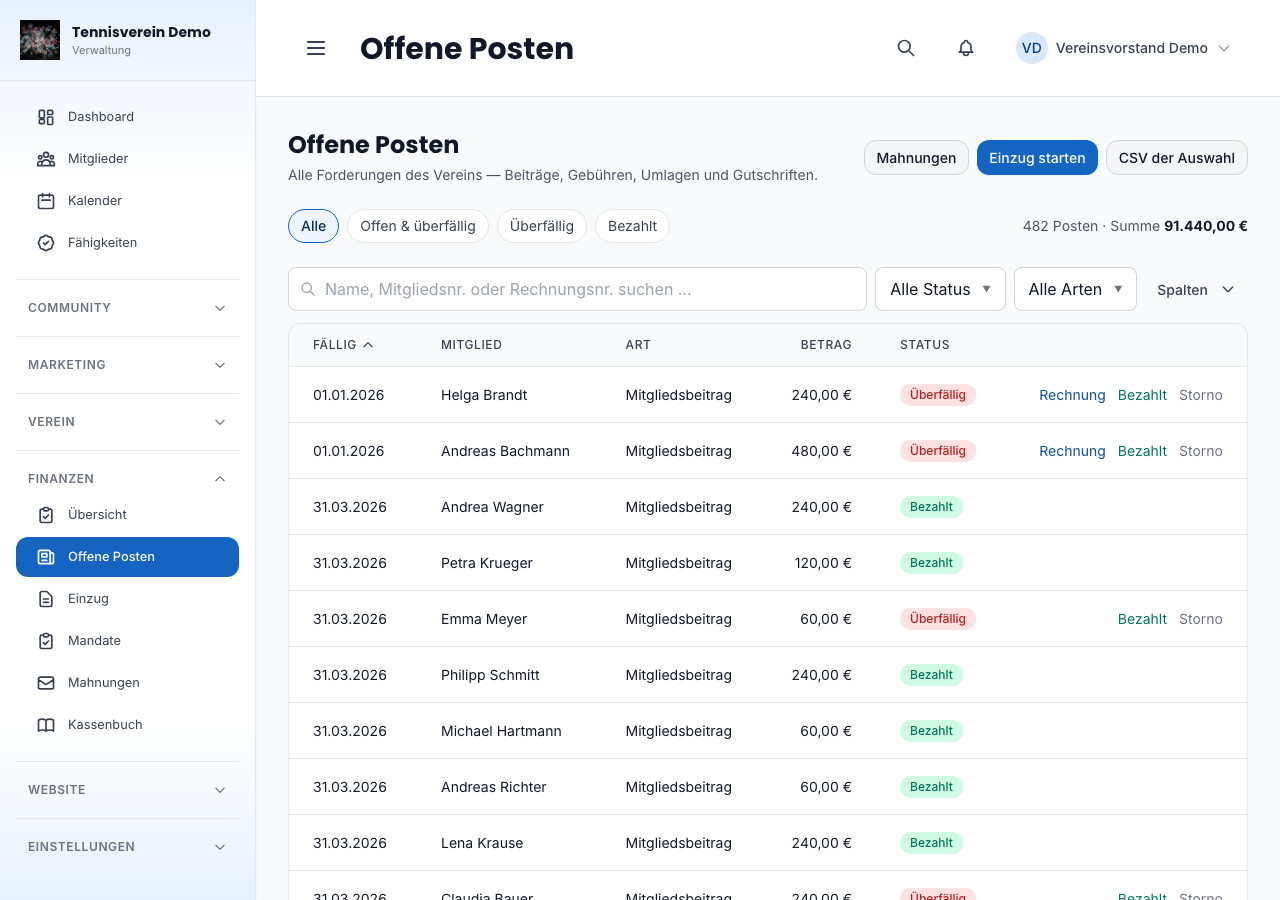
Under Finanzen › Offene Posten (Open items) you see the individual items — not just the totals: every fee, every charge, every credit.
You can search by name or membership number and filter by status, type of item, category and period. Above the list are four quick filters — All, Open & overdue, Overdue, Paid — and next to them it always says how many items that currently is. You decide which columns you see — membership number, category, invoice number and payment date are hidden until you need them.
What you can do per row:
- Bezahlt (Paid) — records a payment that came in by bank transfer or in cash. The item then no longer counts towards the claim.
- Rechnung (Invoice) — opens the invoice as a PDF. The button only appears if there is one, and only for team members with access to finances — in a fee run’s overview too. Invoices carry name, address and amount; your members see their own in the portal.
- Storno (Cancel) — takes an item out of the claim without deleting it. It stays visible so it remains traceable what happened.
- A click on the row takes you to the member.
For the bookkeeping: the CSV der Auswahl (CSV of selection) button exports exactly what is currently filtered. That way the tax adviser gets the list they asked for instead of everything.
Keeping an eye on SEPA mandates
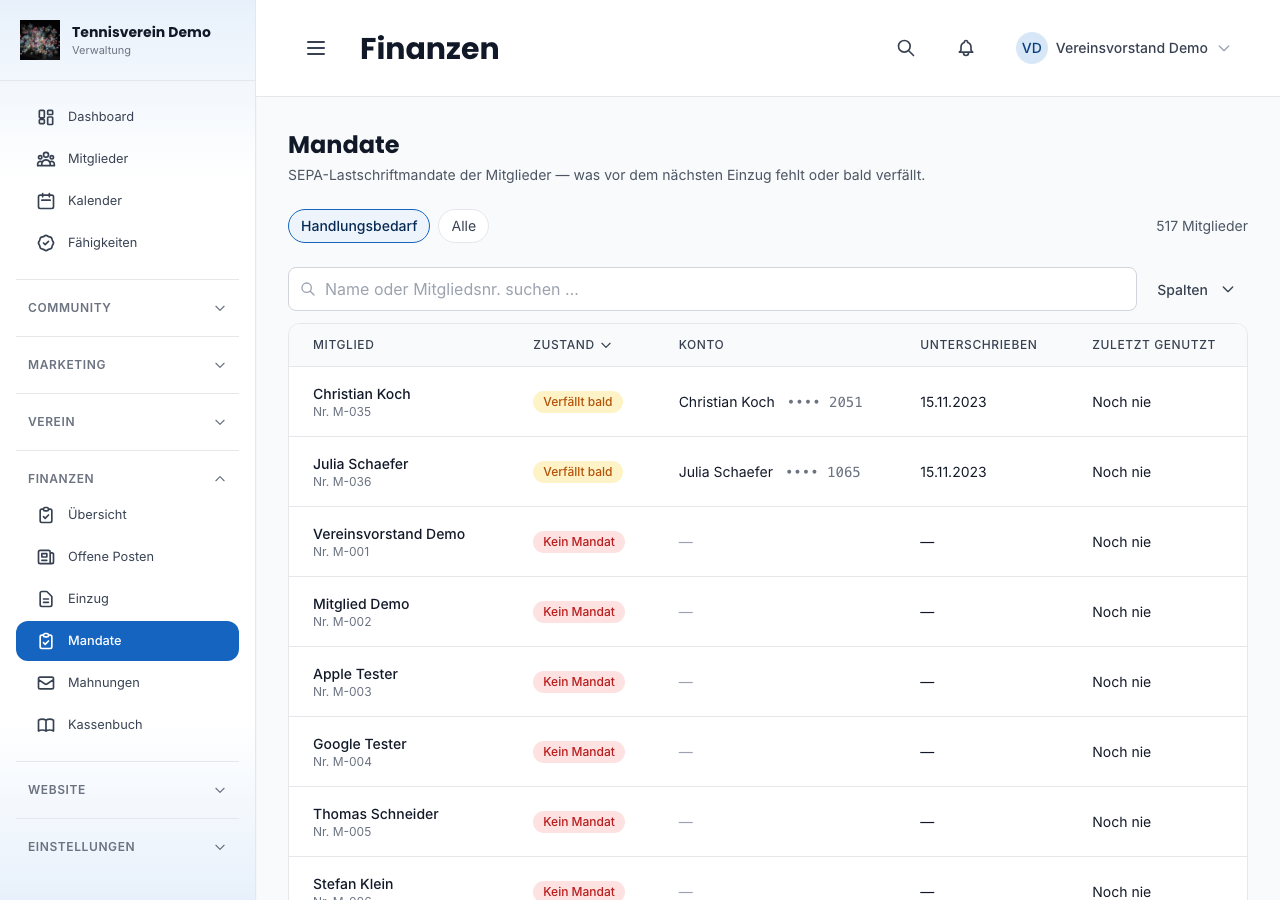
No mandate, no collection. So that this doesn’t only become apparent during the collection itself, there’s a separate list under Finanzen › Mandate: it shows you across the club who is missing a valid mandate, whose mandate has expired and whose will expire in the next three months — the same words that appear on the mandate card on the member. The Handlungsbedarf (Action needed) filter shows exactly these cases first; under Alle (All) you see every member with their status. A click on a row takes you straight to the member.
If someone pays for someone else — a parent for their child, for example — the mandate is with the payer. The child’s row therefore says who that is: the fee is collected via their account, and that’s where the mandate has to be recorded.
Recording a mandate happens in a single place: on a member’s detail page, under the Finanzen tab, you’ll find the SEPA-Lastschriftmandat card. Enter the account holder, IBAN and the signature date of the paper mandate — the scan of the signed paper is optional. A mandate can be recorded without it and collected as normal; you hand in the paper as soon as you get round to it.
Racqt checks the IBAN before it’s saved — exactly the transposed digits that happen when copying it out are spotted immediately instead of only at the bank. It’s stored encrypted; everywhere, only the last four digits are shown.
A new mandate automatically revokes the previous one: two valid mandates would debit twice in the next run. If you revoke a mandate without recording a new one straight away, it’s kept as proof of what once applied — any stored scan stays with the member and can be deleted separately in the Dokumente (Documents) tab.
Did you ever store just a scan without the other details? That was never a valid mandate that could be collected — and it also suppressed the payment reminder to the member. These members were therefore neither debited nor reminded. Check under Finanzen › Mandate who could be affected and record the mandate again once — no need to panic, but better to check once too often.
Collecting fees
The fee run decides what someone owes. The collection decides when and how it’s collected. The two are separate because they happen at different frequencies: fees arise once a year, but collection sometimes happens in two stages.
Under Finanzen › Einzug (Collection) you go through three steps:
1. Preview
You choose up to when fees are included and when the bank should collect. The earliest possible date is already filled in as the collection date — after the period your club has set, even if you yourself aren’t allowed to open the settings. More on this shortly under “When the earliest collection is allowed”. Racqt shows you the number, the total and every planned debit with payer, account and amount. The preview doesn’t change anything — you can have it recalculated as often as you like.
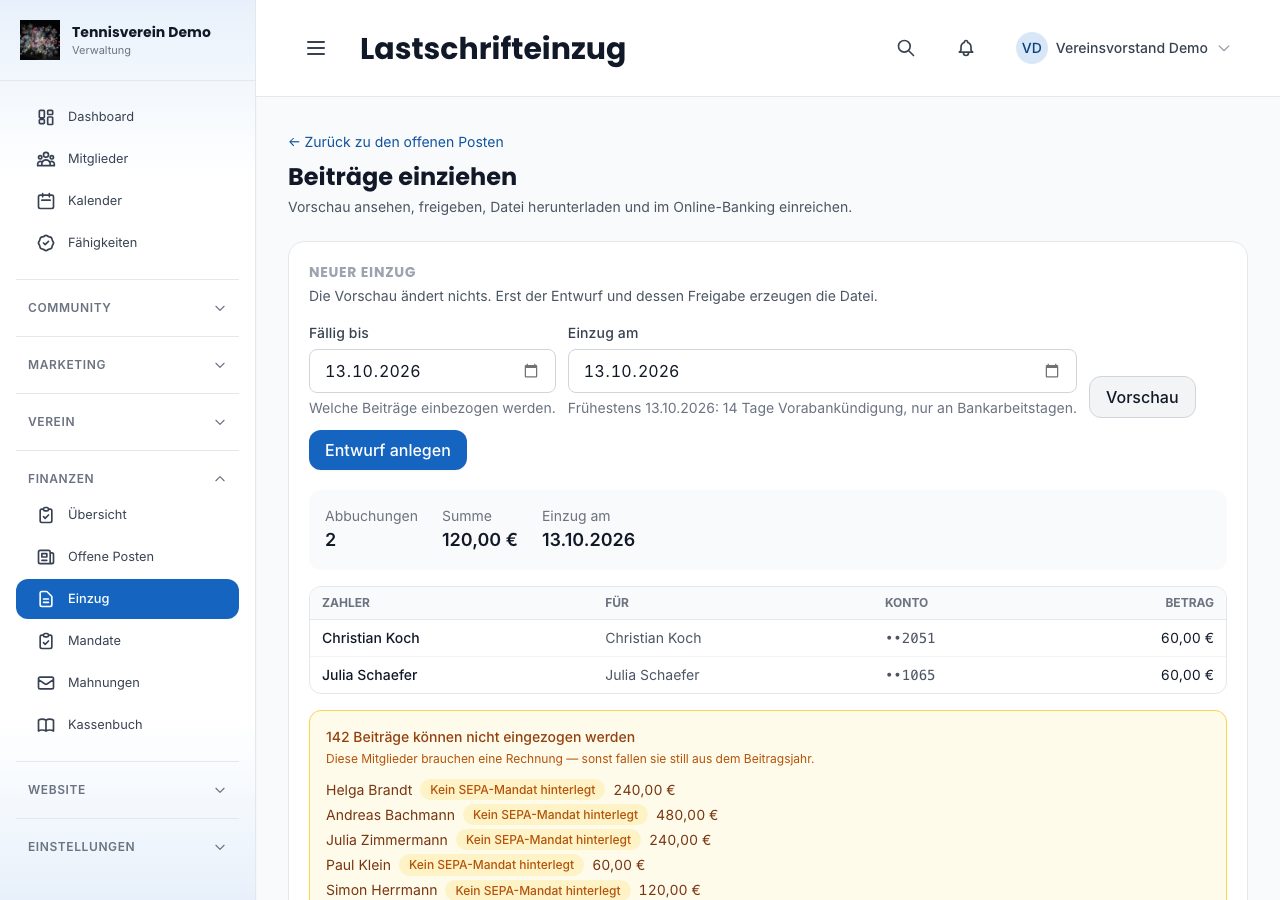
The second part is important: Racqt explicitly names who can’t be debited and why — usually because no SEPA mandate is stored. These members need an invoice, otherwise they silently drop out of the fee year.
2. Approval
Only with approval does something happen: Racqt creates the direct debit file, announces each debit by email and marks the fees as submitted. This step is deliberately separate, because a wrong collection with hundreds of members costs real money and can’t be undone.
The pre-notification is an obligation, not a convenience: your members must know before the debit when how much will be taken. That’s why amount, date, mandate reference and creditor identifier are in the email. After approval, Racqt tells you how many pre-notifications will be sent — they go out right afterwards, and on the collection’s page “versendet” (sent) keeps count. Where an email address or a mandate is missing, Racqt gives you the number — you inform those members yourself.
If a pre-notification doesn’t arrive — the member’s mail server rejects it, Racqt can’t reach it even after several attempts, or an email address is missing —, you see this on the collection’s page: “1 Ankündigung nicht zugestellt” (1 pre-notification not delivered), below it the affected members with the reason. This matters, because without a pre-notification the debit for this member can be challenged. Ideally check the email address in the member record and then send the pre-notification again with Erneut senden (Send again) — anyone who already has theirs doesn’t get a second one. This works as long as the collection is approved and not yet booked. If it doesn’t work in time, inform the member yourself before you submit the file to the bank.
When the earliest collection is allowed
Three rules determine the collection date, and Racqt keeps an eye on all three:
- Pre-notification: your members get the pre-notification as many days before the collection as you’ve set under Einstellungen › Zahlungen › SEPA (Settings › Payments › SEPA). Without a special agreement that’s 14 days — as the direct debit scheme requires.
- One bank working day of lead time: the file must be with your bank at least one bank working day before the collection.
- Only on bank working days: there are no debits at weekends or on the bank holidays (New Year’s Day, Good Friday, Easter Monday, 1 May, 25 and 26 December). Otherwise the bank moves the date itself, and the member sees the debit on a different day from the one announced.
If you choose a date that doesn’t work, Racqt tells you why and names the earliest possible date — you take it over with one click. It’s checked for the preview, the draft and once more at approval: if there’s a weekend between draft and approval, a date that worked yesterday can be too early today.
3. Submitting the file
Download the file and submit it in your club’s online banking. After the due date the fees count as paid unless something is returned.
When a debit is returned
If a collection comes back — insufficient funds, account closed, objection —, you record it on the relevant entry via Rückläufer (Return). The fee is then open again, and you can pass on the bank charge as a separate item; it’s automatically included in the next collection.
With an objection or a closed account, Racqt blocks the mandate: another collection would only produce another charge. With insufficient funds it stays valid — maybe it will work next time.
Your member gets an email with the bank’s reason. Usually a changed bank account is behind it — and only someone who knows about it can correct it. If you don’t want this in an individual case, untick Mitglied benachrichtigen (Notify member) when recording it.
Reminders and dunning
For open fees there are three stages: reminder, first dunning letter, second dunning letter. Racqt suggests who is due and remembers the stage on the fee — so nobody gets the same reminder twice. Between two stages there’s a grace period so that reminder and dunning letter don’t go out on the same day.
You start the run under Finanzen › Mahnungen (Reminders). At the top you choose the stage and the grace period — that’s how long an item must be overdue, and how long ago the previous reminder must have been. Below are everyone who is due, with amount, due date and days overdue. All are ticked; untick anyone you’ve just had on the phone yourself.
Members without a stored email address are marked in the list. For each run you decide what happens to them: by default they’re included and get their letter on paper (see below). With the Diesmal überspringen (Skip this time) tick they stay at their current stage instead and appear in the list again next run.
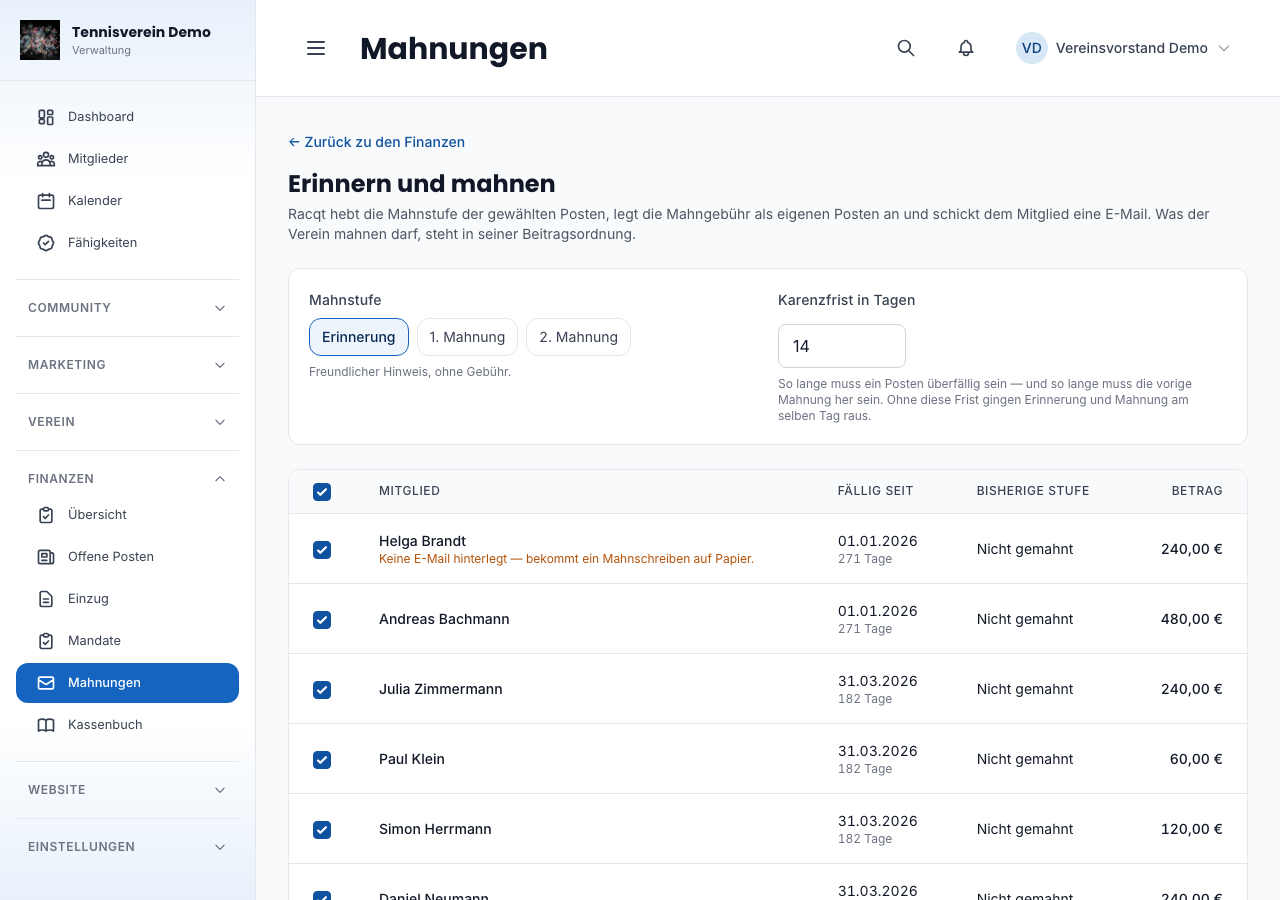
Before starting, you also set the reminder fee per item and the payment deadline stated in the email. A reminder fee only arises if you enter one — without a basis in your statutes it may not be charged, and Racqt can’t decide that for you.
The run runs in the background
A reminder run sends emails, and that takes time — a few minutes for fifty reminders. So the page doesn’t wait for it: the run starts, you keep working, and as soon as the last reminder has been delivered, Racqt lets you know. If your mail server doesn’t accept a reminder straight away, Racqt tries again by itself — the run only counts as finished once everything has been delivered.
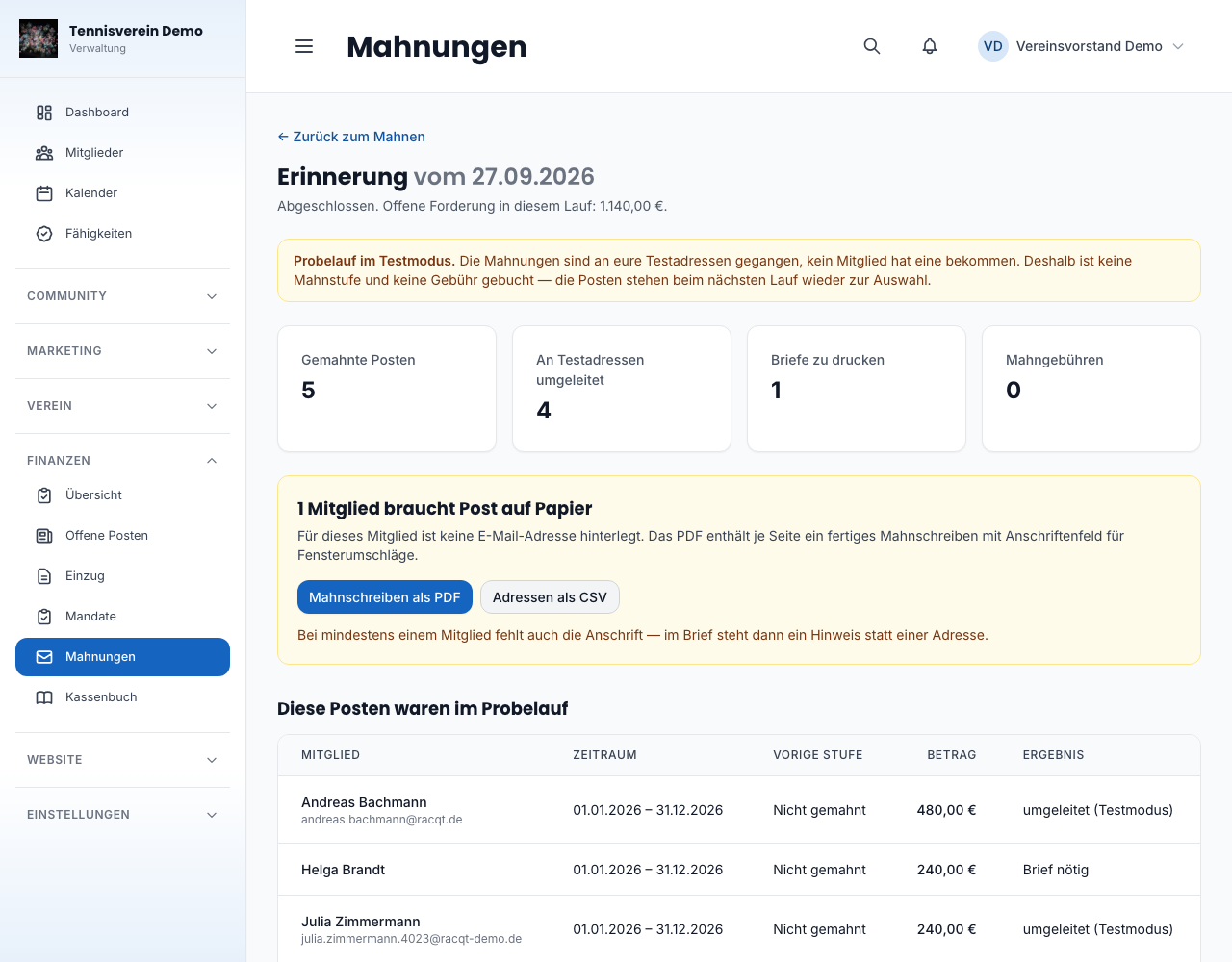
As long as a reminder run is still sending, no second one can be started. This protects against the double click that would otherwise give every member two reminders and two fees. A click on the message opens the summary: who was reminded, what amount is open and what became of each reminder — sent, letter needed or failed.
The summary is kept. You can find it again later via the run and prove when who was reminded.
Resending reminders that weren’t delivered
If a reminder didn’t arrive or sending was interrupted, the summary shows Erneut senden (Send again) — together with the number of reminders missing. One click sends only those — anyone who already has theirs doesn’t get a second one, and nothing more is booked: reminder stage and fee have been fixed since the run.
You don’t have to wait until the whole run is done: if Racqt finally couldn’t deliver an individual reminder, you resend it while the others are still on their way. If a reminder is still being delivered, on the other hand, the summary tells you the time from which you can resend it.
If a member’s mail server rejects a reminder — for example because the address no longer exists —, you find out immediately: the reminder says “nicht zugestellt” (not delivered) with the reason, and the summary advises you to check the email address in the member record first. Then send it again with Erneut senden — or as a letter.
Reminder letters for members without email
Children, non-playing members, inherited records — every club has people without an email address. For them, the summary has its own block with two buttons:
- Mahnschreiben als PDF (Reminder letters as PDF) — one page per member, worded and ready, with an address field for window envelopes. Print, fold, put in the envelope.
- Adressen als CSV (Addresses as CSV) — the same recipients as a spreadsheet, if you’d rather use your own letter template.
The letter says the same as the email for the same stage. If someone is also missing an address, the letter says so instead of an address — then you know where to fill it in in member management.
An email goes out for each stage, in a fitting tone: the reminder assumes the invoice slipped through, the last dunning letter no longer does. All three also say that the payment may already be on its way — there are days between your reminder run and the payment arriving, and nobody should feel wrongly addressed.
Reminder before the due date
A good share of all reminders don’t arise from unwillingness to pay but because an invoice gets lost in everyday life. That’s why Racqt sends a friendly note five days before the due date — automatically, you don’t have to do anything.
This only affects members who pay by bank transfer. Anyone who has granted a direct debit mandate doesn’t have to do anything anyway and gets the collection’s pre-notification instead.
Who appears as the sender
Invoices, reminders and pre-notifications come from your club: with your logo, your colour and your name as sender; the footer names you as the responsible party with address and representatives. Where you maintain this and what’s needed for it is described in the settings.
Trying out emails first
The first fee run or reminder run is the one where you want to know what actually lands in the inbox — before 600 members get mail. For this there’s test mode under Einstellungen › Allgemein › E-Mail (Settings › General › Email).
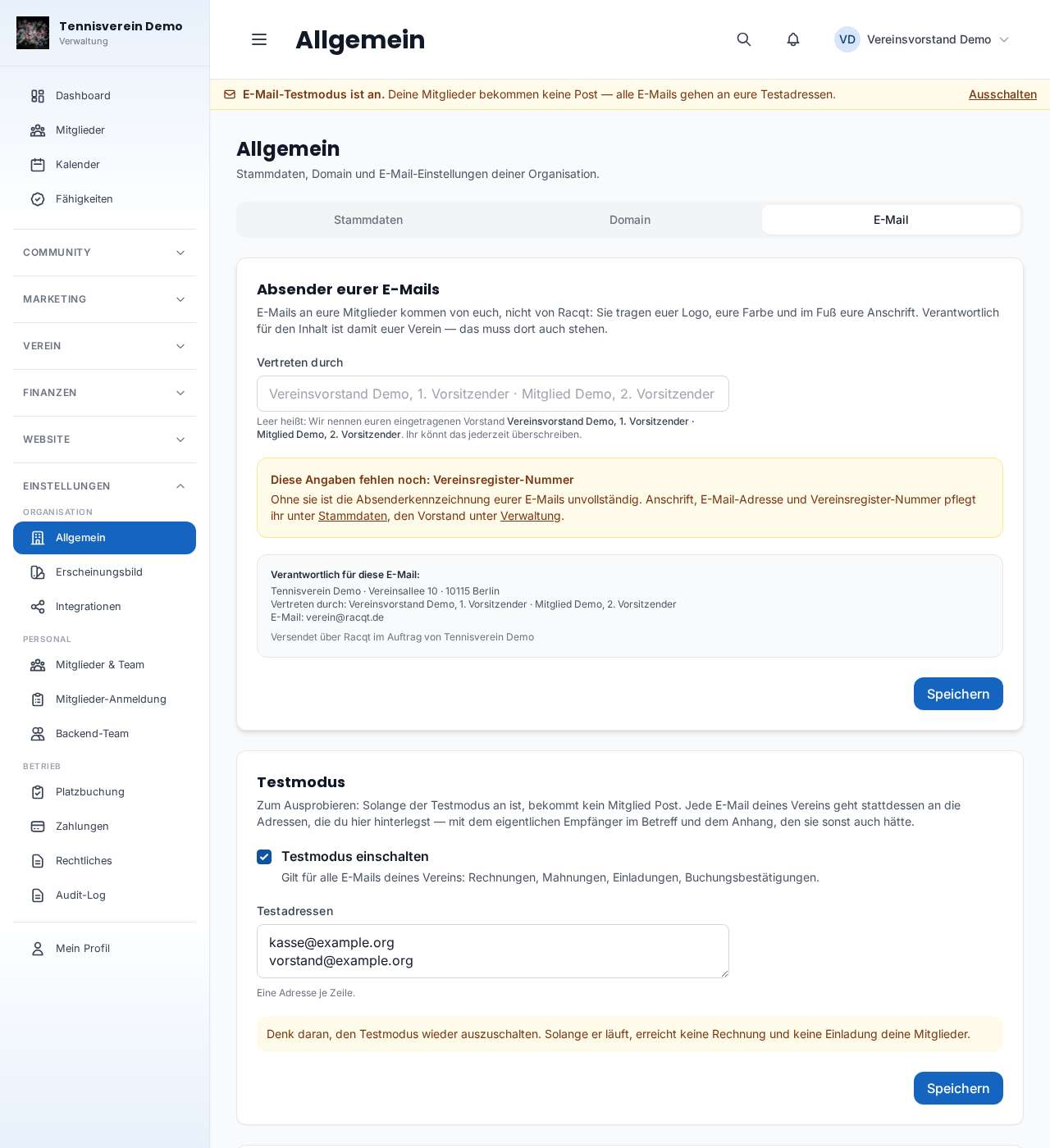
Here’s how it works: an admin of your club enters one or more of their own addresses and switches it on. Because test mode redirects every email — including invoices and invitations —, only admins may switch it; everyone else sees its current state. From then on, every email from your club goes to these addresses instead of to the members — invoices, reminders, invitations, booking confirmations. The actual recipient is in the subject, a note appears above the email, and the invoice PDF is attached as normal.
Two things that save you trouble:
- Test mode can’t be switched on without a stored address. Otherwise nothing at all would be sent, silently, and it would only be noticed weeks later.
- As long as it’s on, a notice bar appears above every admin page, with a link to switch it off. Everyone in your team sees the bar — including people who only look after bookings or finances and aren’t allowed to open the settings, because their emails go to the test addresses too. Test mode is the switch you turn on and forget — the only thing that helps is keeping it visible.
A trial run stays a trial run: as long as test mode is on, a redirected email doesn’t count as delivered. A reminder run then sets no reminder stage and creates no reminder fee — the summary shows it as a Probelauf (trial run), while the emails are still on their way and even if only letters would be needed. It tells you honestly where the emails are right now: while they’re on their way, it says they “werden gerade an eure Testadressen verschickt” (are being sent to your test addresses) — only once the run is finished does it say they’ve arrived there. Each reminder says “umgeleitet (Testmodus)” (redirected, test mode), and the items are available for selection again in the next run. A trial run stays one even if you switch test mode off afterwards. Likewise, invoices and pre-notifications only count as sent once they have really arrived with the member.
Emails belonging to a user account aren’t affected: password reset and account activation still reach the right person.
Related articles: Fees · Cash book · Member management · Settings & branding
In the changelog:1.6.0