Racqt
Racqt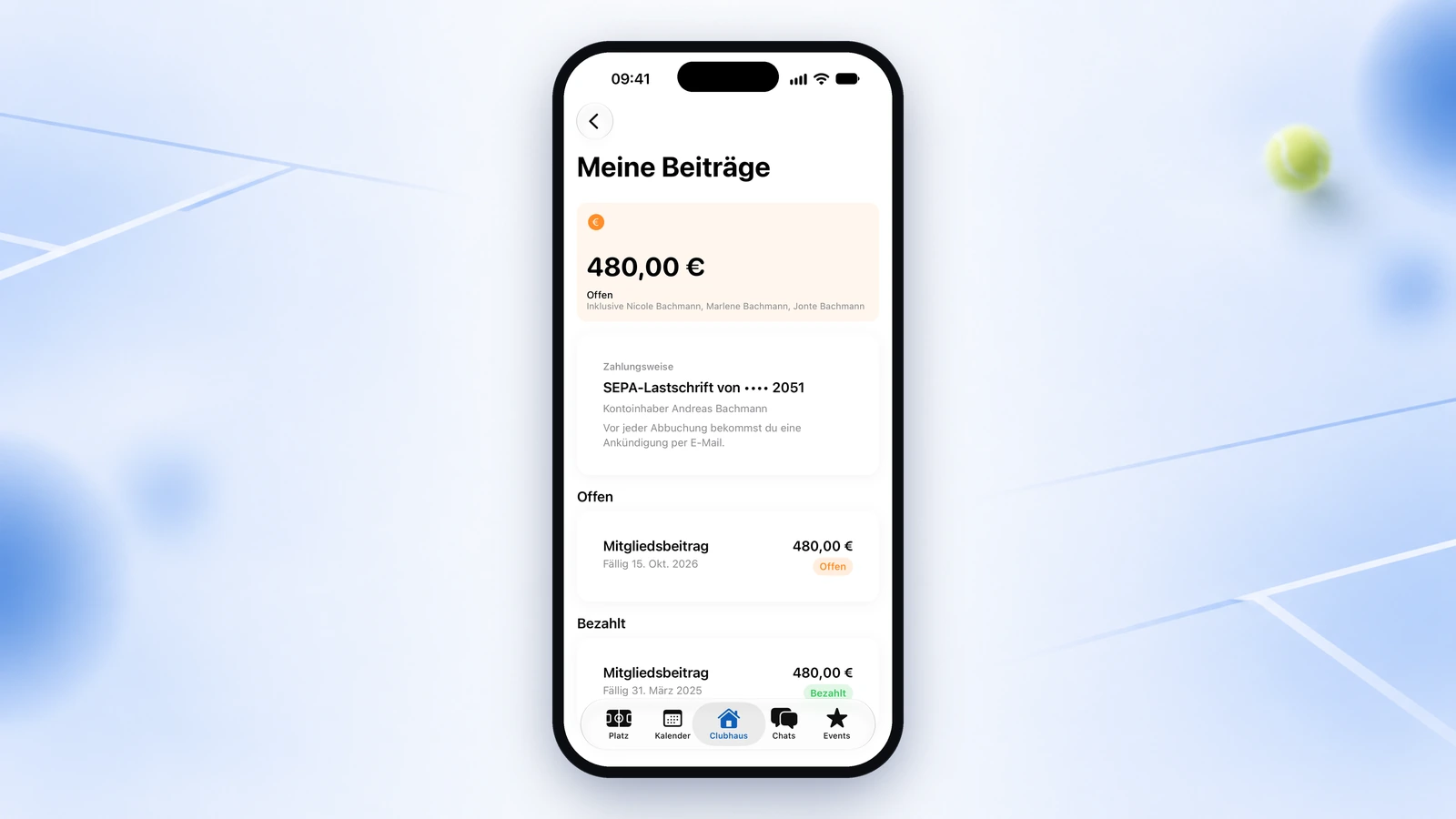
Racqt 1.6 is live. From today you can keep your members and their fees entirely in Racqt — from the membership application to the debit. In the detailed preview article we told you why we built this release. Here you’ll find the compact overview: what’s new and where to read more in the help centre. The interface is in German; we name the German labels where it helps.
Managing members
- Members without their own email address — children, non-playing members or inherited records belong just as much as everyone else, with membership number, fee and member record.
- Families: you enter who pays for whom. Invoice and debit go through one person, and the receipt still shows whom the fee is for. A family fee covers the whole household with one amount.
- Cancellations: Racqt suggests the right leaving date from your statutes’ notice period.
- The member list shows status, age, joining date and family, can be sorted and searched, and you decide which columns you see.
More in the help centre: Managing members.
Invitations instead of direct linking
Anyone who already has a Racqt account is no longer simply linked to your club but gets an invitation and decides themselves whether to accept. That way everyone decides which club sees their profile. Anyone who later wants to use the app after all also gets an invitation — membership number, fees and history are kept.
On a member’s detail page you can see whether an invitation is still pending, which address it went to and how long it’s valid. With one click you send it again or withdraw it. In the CSV import, email addresses are stored as contact addresses; you then give app access by invitation.
The same applies to teams: anyone added to a team by email accepts the invitation in the app under “Mannschaften” (Teams) — until then you see the person as pending. You invite substitutes from other clubs as guests with a tick, and every invitation names the team and the club.
More: Registration & invitation, Teams & season planning and Teams for players.
New members sign up online
Anyone who wants to join fills in the form directly on your club page — without having to register with Racqt first. The fee is chosen at the same time, and Racqt only shows what suits the person’s age. The SEPA direct debit mandate is part of the sign-up, and you decide whether it’s required. Families sign up together. One click turns a sign-up into a member with a number and a member record.
More: Online sign-up for clubs and Payments & SEPA mandates.
Fees and finances
“Beiträge” (Fees) and “Finanzen” (Finances) are now two separate areas. Under Fees you set the fee rates and start the fee run; under Finances you see received, open and overdue as real amounts and take care of collection and reminders. Whoever keeps the books gets separate access for this.
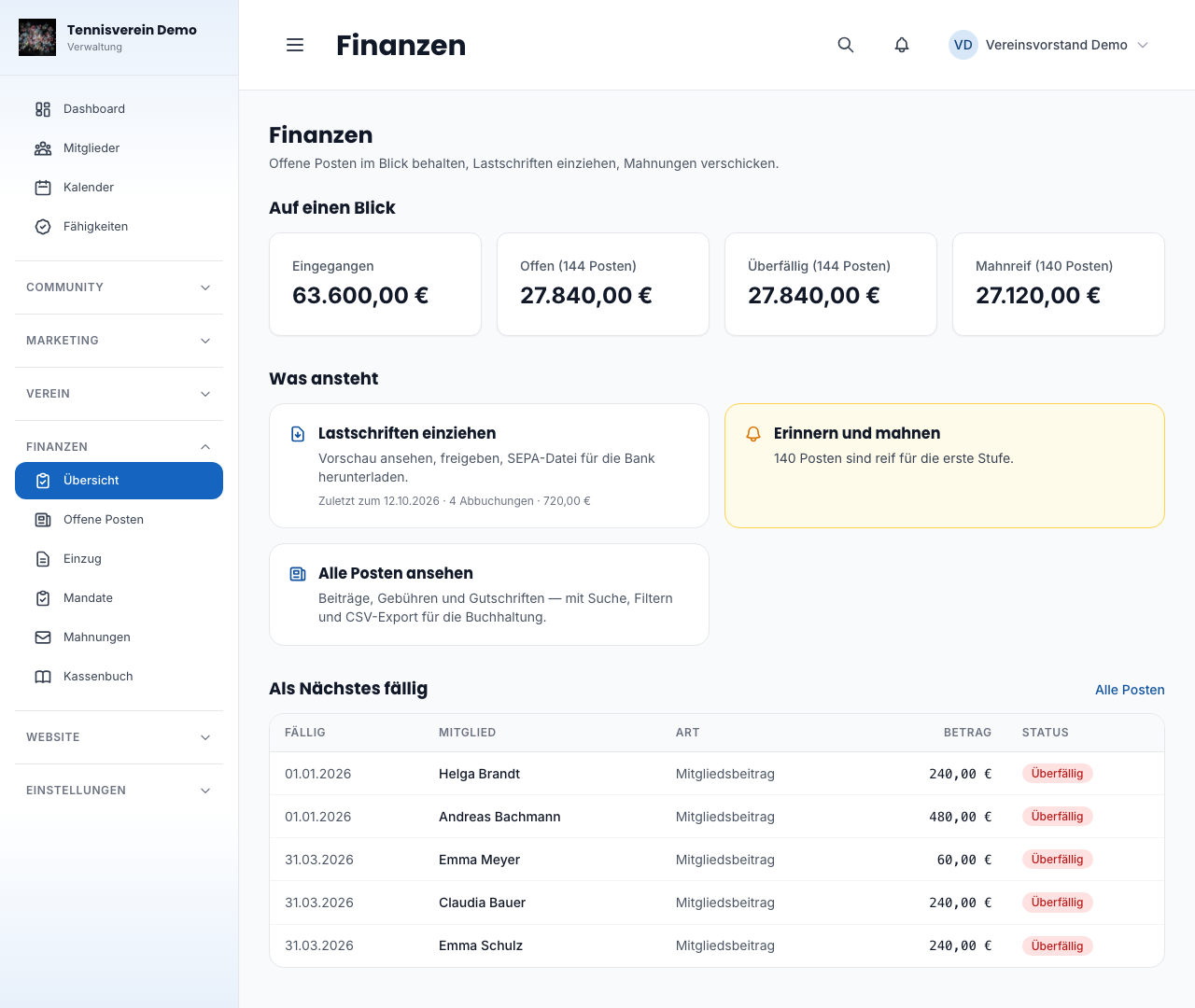
- Fee run: creates the fees due and the invoices. Anyone who joins in July or leaves in March pays pro rata — exactly how depends on your statutes.
- SEPA direct debit: look at the preview, approve, download the file and submit it in online banking. Before every debit your members get a pre-notification with amount, date and mandate reference, and a family sees one debit instead of three.
- Mandates at a glance: a separate list shows you before the next collection who is missing a valid mandate or whose mandate is about to expire.
- Returned debits are recorded with one click: the fee is open again and the bank charge is passed on.
- Reminders and dunning in three stages, with a deadline in between — nobody gets the same reminder twice. A reminder fee only arises if you set one. For members without an email address you print ready-made reminder letters as a PDF.
- Payment reminder: a few days before the due date, a friendly reminder goes to everyone who pays by bank transfer.
More: Fees and Finances: open items, collection, reminders.
New: the cash book
For the treasurer there’s now a cash book: you enter what happens on your accounts — cash or via the bank — with a running balance for every entry. Every category gets a tax sphere, an approved collection is suggested for you to take over, and at the end of a period you lock the period — the natural moment before the cash audit.
More: Cash book.
What your members see
In the app and the portal, every member can see for themselves what the club has charged: open items, paid fees and the payment method. With direct debit, the last four digits of their account number are shown, and anyone who pays for their children sees their fees too.
Emails that come from you
Emails to your members now carry your name as sender, your logo and your club colour — and replies go to you. The footer names your club as the responsible party and links to the legal notice and privacy policy of your club page. All emails look consistent and are easy to read everywhere: in Outlook, on a phone, in dark mode and even when images are blocked.
Before the first big send-out, test mode helps: all your club’s emails then go to your own addresses instead of to members, and a notice above every admin page reminds you that it’s on.
More: Settings & branding.
Usability, accessibility and apps
- Every window in the dashboard and portal closes with the Escape key, and all input fields are labelled for screen readers.
- Colours mean the same everywhere: green means done, yellow is waiting, red needs attention.
- Large lists in the dashboard can be searched, sorted and reduced to the columns you care about.
- In the apps, dark mode is readable throughout, and images load noticeably faster on the iPhone.
- If a club is no longer active, it disappears from “Meine Vereine” (My clubs). If it was open in My Club mode, the app switches by itself to your next club.
More: Racqt with keyboard and screen reader, Apps for iPhone & Android and My Club mode.
Security and data protection
- Like the Android app, the iPhone app now checks with every connection that it’s really talking to the Racqt server.
- Your members’ invoices can only be opened by team members with access to finances; members still find their own invoices in the portal.
- Documents on a member, such as a membership application, only open via a link that’s valid for a few minutes.
- Anyone who mistypes several times in quick succession gets the honest note that a short pause is needed — instead of doubting their login details. This also applies to registration and “Passwort vergessen” (Forgot password).
- If a message via the contact form doesn’t reach us or your club for once, the form says so straight away and names an address where the message will still arrive.
More: Registration & invitation and Contact form for clubs.
What now?
The website and the club dashboard are up to date from today. The apps for iPhone and Android follow after review by Apple and Google; your device will let you know by itself as soon as the update is ready for you.
You’ll find every single point in the changelog for version 1.6.0. If you have questions while switching over or something is missing, write to us — almost everything in this release started as a wish in an email or a conversation at the court.